All blog
Here at PowerSyncPro quite often we get asked; Should clients upgrade their devices to Windows 11 before migrating to Entra Join aka “Cloud native”?
PowerSyncPro Migration Agent can migrate both Windows 10 and 11 devices. There is no prerequisite to be on Windows 11 to migrate a device to cloud native.
With Windows upgrades, in reality there is no right or wrong answer, and it comes down to your business preferences, requirements and/or technical capabilities plus upgrade tools at your disposal. But, because you do need to pick a lane, then we would advocate migrating devices to Entra Join and Intune enrolled before upgrading to Windows 11 via Intune Windows updates, Feature updates.
The minimum Window OS release to Entra join and Intune enroll is Windows 10 version 1709 (Build number: 16299). The GA release date was October 17, 2017 – 8 years ago!
Therefore Windows 10 should not be a blocker for you migrate to Entra join, but do not delay your upgrade to Windows 11!
Windows 10’s official end of support date is October 14, 2025. After that date, Microsoft will no longer provide security updates, feature updates, or technical support for Windows 10. PCs running Windows 10 will still work, but they’ll be more vulnerable to security risks.
Separate projects
We are never fans of tying one project to another. If you tie your “Cloud first strategy” to a Windows 11 upgrade path, then your Windows 11 application testing will almost certainly impact your ability to realise the success of your cloud first aspirations.
So, decouple them. Make them separate projects. Migrating to cloud first will be much quicker and an IT project win for all concerned.
PowerSyncPro Migration Agent will migrate a device from Hybrid Entra joined (or just AD joined/WORKGROUP) to Entra Joined in typically less than 15 minutes. It is therefore very quick and easy to realise the benefits of being cloud native for your devices.
Read about the benefits of cloud native here: PowerSyncPro – Switch to Microsoft Entra Joined Devices
Upgrade options
If a business has no upgrade tooling today, then they are limited to user-initiated updates via Windows Update (If the device meets hardware and compatibility checks, Windows Update will offer the Windows 11 upgrade) or the Installation Assistant (manual download from Microsoft site).
We think most IT professionals would agree that it is not fair to ask users to undertake such a major task, and quite frankly is most likely destined for failure.
Other IT Tool driven upgrades like SCCM ConfigMgr, Windows Update for Business (WUfB), Windows Server Update Services (WSUS), Altiris and other RMM tools will also get the job done, but as you are moving to cloud native devices you are almost certainly deep into your Intune build and configure.
Intune deployments will become second nature, and devices will be added to re-usable patching and ring groups. So don’t delay.
Upgrade to Windows 11 with Intune
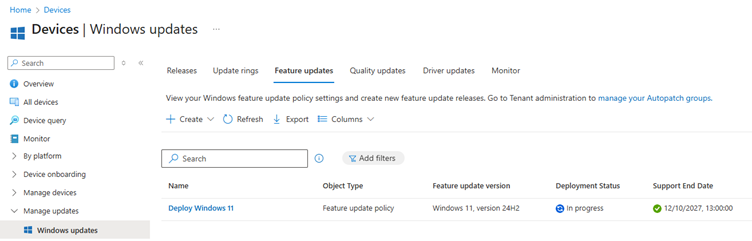
By joining devices to Entra ID and enrolling into Intune, businesses gain the ability to push Windows 11 as a Feature Update policy centrally, control which devices upgrade, and report on upgrade status.
Windows 10 support ends on October 14, 2025
As a reminder, Windows 10 will reach the end of support on October 14, 2025. At this point technical assistance, feature updates and security updates will no longer be provided. If you have devices running Windows 10, we recommend upgrading them to Windows 11- a more modern, secure, and highly efficient computing experience.
Extended Security Updates (ESU) program for Windows 10
There is an Extended Security Updates (ESU) program that allows eligible Windows 10 systems to continue receiving security updates beyond the official end date. For consumers, this extends to October 13, 2026 for Windows 10 version 22h3.
If devices do not meet the technical requirements to run on Windows 11, we recommend that you enroll in the Windows 10 Consumer Extended Security Updates (ESU) program or replace the device with one that supports Windows 11 Extended Security Updates (ESU) program for Windows 10 | Microsoft Learn
Ready to Go Cloud Native?
Don’t let OS upgrades slow down your cloud-first strategy. With PowerSyncPro Migration Agent, you can migrate devices to Entra Join quickly and confidently, whether they’re running Windows 10 or 11.
Book a demo



.png)